Retrieve, view, store, archive, manage, and burn medical images
Sante DICOM Editor is a professional DICOM editor, 2D/3D viewer, anonymizer, converter, dicomizer, PACS client, mini PACS server,
patient CD/DVD creator (including a free DICOM viewer), and much more.
It is compatible with Windows 11/10 and Windows Server 2025/2022/2019/2016.
Perpetual License
The software comes with a perpetual license that never expires, with no annual, renewal, or contract fees. Updates, maintenance, and
technical support are free. Registered users can download, install, and use every new version at no additional cost.
Free demo
The free demo version is fully functional for 90 days.
 Download it now! Download it now!
A truly unique viewer
Sante DICOM Editor is not "just another DICOM viewer" built using freely available libraries such as DCMTK, ITK, and VTK, like hundreds of
other DICOM viewers that differ mainly in their appearance, menus, panels, and dialog boxes. It is a distinctive application with advanced capabilities, designed
and developed entirely in-house from the ground up using advanced development tools. It is the result of research and development in DICOM imaging over
more than two decades.
A powerful DICOM editor
Sante DICOM Editor is an industry-leading post-processing application for DICOM file editing,
conversion, and management. It is used by major corporations and medical equipment manufacturers and is a preferred DICOM editor at
leading universities and hospitals worldwide. Among its many capabilities, it allows users to modify DICOM files, add or remove attributes, and edit
sequence attributes.
Privacy and data protection
-
The program connects to the internet only to validate the registration key and check whether a newer
version is available (an optional user setting).
- The program does not record or transmit user activity or user data.
-
The program does not transmit patient data except through DICOM transfers configured and managed by the
user, including communication with other DICOM nodes, printers, and CD/DVD disc publishers.
Screenshots (click to enlarge)
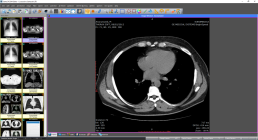 |
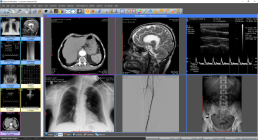 |
| The main interface |
The program supports all modalities
|
 |
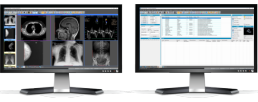 |
| The series mode |
Dual monitor support |
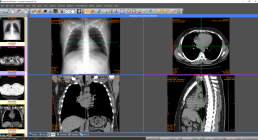 |
 |
| Multiplanar reconstruction (MPR) mode |
The 3D model view interface |
 |
 |
| Ultrasound region calibration module support |
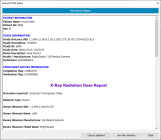
Structured Report support |
 More screenshots More screenshots
Features and benefits
- Powerful 2D/3D DICOM workstation, viewer, and editor
- Perpetual license that never expires
- Free updates and free technical support for the lifetime of the product
- PACS client that supports all the DICOM network services (C-FIND SCU/SCP, C-MOVE SCU/SCP, C-STORE SCU/SCP, C-GET SCU/SCP, C-ECHO SCU/SCP)
- Can also be used as a mini PACS server
(the number of stored patients and studies is limited only by available disk space)
- TLS support for DICOM network connections
- OHIF viewer integration (studies can also be reviewed using the OHIF viewer)
- Migration tool for transferring files from other DICOM viewers
- Command-line switches for integration with PACS servers (learn more...)
- Easy to use, with a native Windows look and feel
- Support for all character sets (Latin, Chinese, Japanese, Korean, Cyrillic, Arabic, Greek, Turkish, etc.)
- Creation of 3D models using the isosurface technique
- Creation of 3D models using transfer functions (volume rendering)
- Creation of 3D models using maximum intensity projection (MIP)
- Online, context-sensitive help
- Compatible with all modalities (CT, MR, NM, US, XA, MG, CR, etc.), all manufacturers, and all DICOM 3.0 and NEMA 2 file types.
- Editing and modification of DICOM files, including sequence attributes
- Simultaneous editing of all DICOM files in a series or study
- DICOMDIR editor
- Dual-monitor support (learn more...)
- Structured Report support
- Presentation State file editor
- Structured Report file editor
- Side-by-side study comparison
- Attaching PDF reports to studies
- Encapsulated PDF DICOM file support
- Printing to DICOM printers and Windows printers
- DICOM-to-DICOM conversion and file modification (transfer syntax, image width and height, color depth, frame insertion, removal, sorting, etc.)
- Built-in anonymizer and burned-in annotation removal (patient data de-identification to help support compliance with EU GDPR Regulation 2016/679)
- Built-in Dicomizer: create DICOM files from video files (AVI, WMV) and standard image formats (JPEG, JPEG 2000, TIFF, BMP, and PNG)
- Ultrasound region calibration module support (calibrated ultrasound measurements)
- Merging DICOM files
- Creation of DICOM CDs/DVDs with a free DICOM viewer for Windows and macOS
- Support for Epson and Primera CD/DVD disc publishers (robots)
- Fast graphics engine (Direct2D)
- Export MPR reconstructed planes as DICOM series
- Import images as DICOM files into series, studies, or patient records
- Import frames into DICOM files
- Remove frames from DICOM files
- Replace images in DICOM files
- Export network and database search results as CSV files
- Option to generate new Study, Series, and SOP Instance UIDs during anonymization
- Compatible with Windows 11/10
- Free demo version that works for 90 days (
 Download it) Download it)
 Feature list Feature list
Comparison with Sante DICOM Viewer Pro
Sante DICOM Editor includes all the features of Sante DICOM Viewer Pro plus the following:
- DICOM file editor
- Batch modification of DICOM file headers (insert, modify, or delete attributes) using templates
- DICOM-to-DICOM conversion and file modification (transfer syntax, image width and height, color depth, frame insertion, removal, sorting, etc.)
- Built-in anonymizer with templates (users can specify additional attributes to anonymize and replacement values, such as a blank value or "anonymized")
- Built-in Dicomizer: create DICOM files from video sources and standard image formats (JPEG, JPEG 2000, TIFF, BMP, and PNG)
- Creation of a single multiframe DICOM file from multiple files in the same series
- Splitting a multiframe DICOM file into multiple single-frame DICOM files
- Batch conversion of older NEMA 2 or non-Part 10 files to DICOM 3 Part 10 files
- Batch conversion of DICOM 3 files to NEMA 2 format
- Batch compression of uncompressed DICOM files (JPEG, JPEG Lossless)
- Batch conversion of compressed DICOM files to an uncompressed DICOM format
- Batch anonymization using templates (users can specify additional attributes to anonymize and replacement values, such as a blank value or "anonymized")
- Batch conversion of standard images (JPEG, TIFF, BMP, GIF, PNG) into single-frame or multiframe DICOM files using templates
- Batch conversion of video files (AVI) into multiframe DICOM files using templates
Minimum system requirements
- Windows 11/10 or Windows Server 2025/2022/2019/2016
- Intel Core i3 / AMD Ryzen 3 or better
- 8 GB RAM or more (16 GB for large ultrasound files)
- Graphics card with 2 GB of memory and DirectX 11 support
- Monitor with a resolution of 1366 × 768 or higher and true color (16 million colors)
Download the application
Price list
License Type

|
Price
|
Single User License
- Perpetual license (never expires)
- Free updates to all future versions
- Free maintenance and technical support
|
480 US$
(for one user; volume discounts are available)
|
Site License
- Perpetual license (never expires)
- Free updates to all future versions
- Free maintenance and technical support
|
2500 US$
(for one site; volume discounts are available)
|
|




 Sante DICOM Editor
 What's new in the current version
 Order it now
 Ask for a written quote
 Participate